
Digital Printing Nozzle
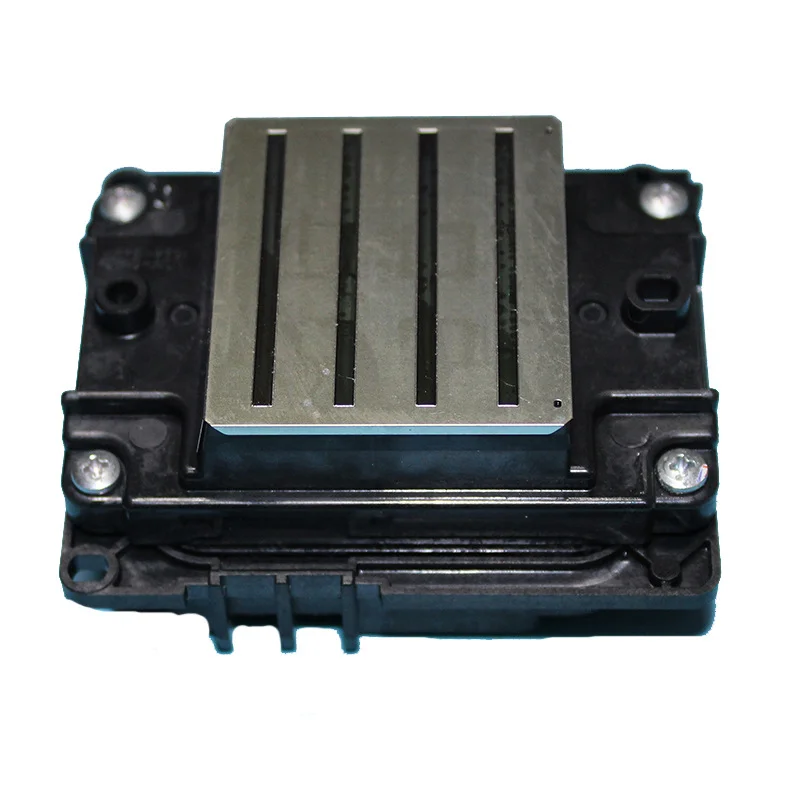
The print head is the most core component of the printer, inkjet printer, and inkjet printer. More than 90% of the effect and quality of the machine's drawing are determined by the quality of the print head. However, the print head is the most expensive among them and the most easily damaged. Because of these particularities, the manufacturer has done various harsh tests before the nozzle leaves the factory, and there will be no quality problems.
Precautions for nozzle replacement:
1. After receiving the nozzle purchased from our company, go back and use a needle to inject water to check the nozzle to see if it is blocked. This is a very redundant and dangerous practice. First of all, once the sprinkler head enters the water, you can turn on the machine before it is dry, which will burn the board at light, and burn the head in severe cases; secondly, the sprinklers sold by our store have been strictly tested and tested It is shipped only after a good time, and it has a protective liquid. If you inject water into the head with a needle, not only will the protective liquid in the head be washed away, but also because the pressure of the hand is too high, it is easy to cause air blockage of the nozzle, resulting in no ink.
2. The head surface of the nozzle is very fragile and must not be bumped, so be sure to protect it. Its surface is a piece of aluminum, and the inner layer is coated with a crystal oscillator and very small ink tubes. When touched, it will be concave, deformed, or even broken, so the nozzle will be scrapped.
3. Be careful when installing the print head, be sure to turn off the power first and install it in place. After installation, push the trolley to move left and right with your hand to check whether it is smooth. Do not turn on the power after installation, because if the head is not in place, the trolley will easily break the head when it moves, and the human hand can feel it, and it can be retracted freely., strong controllability.
4. When connecting the plug cable, do not bring ink, and make sure that it is in good contact with the socket and does not touch the feet, otherwise the nozzle will be short-circuited and burned.
5. The steel shaft should also be clean and smooth. It can be wiped with a paper towel with some lubricating oil. Do not add oil directly to the shaft. The excess oil will flow to the nozzle and cause damage.
6. After the mechanics and circuits are correct, it is necessary to check the water circuit. First, check that the amount of water in the ink cartridge is insufficient; second, check whether the small cleaning blade and the ink suction pump are dirty.
7. There will be air in the newly installed nozzle, so the printing will not be normal immediately. Only after the air in the head is completely exhausted, can the lines be produced normally; first, intermittent cleaning can be used (clean only 2 times at a time, and then stop for 30 minutes. After cleaning 2 times again) Repeatedly over-cleaning will cause the cleaning pump to accumulate ink, which will not only cause the printing to mix colors, leak ink, but also waste ink; secondly, you can print more pictures to let the nozzles exhaust air during work; Again, if the machine has led out the waste ink tube, you can cut off the power first, and then use a syringe to cover the rubber tube to extract the waste ink tube until 3-5ML of ink is drawn out, then turn it on again, and use the machine to clean it normally once, which is equal to Artificially pulling out the air in the head, the side effect is that it is easy to cause the cleaning pump to accumulate ink.
Frequently Asked Questions
What is Digital Printing Nozzle?
The print head is the most core component of the printer, inkjet printer, and inkjet printer. More than 90% of the effect and quality of the machine's dra…
About McLantis & Ordering FAQ
About McLantis Technology
What is laser direct imaging (LDI) and how does it work?
LDI (Laser Direct Imaging) uses a focused laser — driven by our proprietary Laser MEMS and DLP digital optics — to expose circuit patterns directly onto photoresist-coated boards, replacing traditional film and contact exposure. It delivers micron-level registration, higher yields and faster job setup for PCB and advanced packaging production.
What is computer-to-screen (CTS)?
CTS (Computer-to-Screen) writes the screen image directly onto the emulsion-coated mesh with a digital optical head, eliminating film, capillary film and manual exposure. It is the standard prepress step for textile, ceramic, glass and industrial screen printing.
Which industries do McLantis systems serve?
Our direct-imaging and prepress equipment is used across PCB fabrication, screen printing, textile and ceramic decoration, glass and packaging, and precision micro-fabrication — from prototyping shops to high-volume factories worldwide.
Products & Customization
What product lines does McLantis offer?
We offer LDI laser direct imaging systems, CTS computer-to-screen systems, CTP platesetters, digital inkjet printing lines, and custom DLP / Laser-MEMS micro-fabrication lines built on shared precision motion-control and optical platforms.
Can McLantis equipment be customized for my process?
Yes. Beyond standard models, we design custom exposure and imaging lines — different fields of view, resolutions, substrates and throughput — around our modular Laser MEMS and DLP engine. Share your substrate size, resolution and capacity targets and our engineers will propose a configuration.
What substrates and software are supported?
Systems handle standard PCB substrates, screen meshes, plates and roll or sheet media. Imaging is driven by open file workflows (Gerber, PDF, TIFF) and is compatible with mainstream RIP and prepress software; our team assists with integration during installation.
Ordering, Pricing & Lead Time
How do I request a quote?
Use the inquiry form on our Contact page or email info@mclantisgroup.com with your application, substrate, resolution and target throughput. Our sales engineers reply within 48 hours with a configuration and quotation.
What is the typical lead time and minimum order quantity?
Standard models typically ship in 4–8 weeks; customized lines are quoted case by case. The minimum order quantity is one unit, and we support single-machine pilot deployments before line-scale rollout.
What warranty and after-sales coverage is included?
Every system ships with a standard 12-month warranty covering the optical engine, motion system and controls, with global technical support, remote diagnostics and on-site service options through our regional bases.
Support, Installation & Service
Do you provide installation and operator training?
Yes. Each system is delivered with on-site or remote installation, calibration and hands-on operator training so your team can run production confidently from day one.
How are spare parts and long-term service handled?
We stock critical spares at our regional manufacturing bases and ship globally. Preventive-maintenance plans, firmware updates and lifetime technical support keep your line running throughout its service life.
Do you support export, shipping and local compliance?
We export worldwide with experience across Asia, Europe, the Americas, the Middle East and Africa. Equipment is built to meet common electrical and safety standards, and we handle documentation, crating and freight to your port.